Spreadsheets · Popular
Debt Payoff Planner
Turn a pile of balances into a plan and a date. List your debts, pick snowball or avalanche, and the planner ranks what to attack first, projects the months to freedom, and shows the interest you'll save, with a payoff curve that makes the progress feel real.
$9one-time · yours forever
Instant delivery
Google Sheets & Excel
Yours to keep & edit
What's inside
Built to do the work for you.
Snowball or avalanche
Compare both strategies and see which clears the debt sooner.
Debt-free date
A live months-to-free countdown as you log payments.
Progress chart
A shrinking-balance line that makes the momentum visible.
Interest saved
See how much extra payments save you over the life of the debt.
A closer look
See it before you buy.
What's inside, tab by tab
4 tabs, each doing one job well.
Start Here
A one-page guide: list your debts, choose a strategy, set an extra payment, and read your payoff date.
Settings
Set your extra monthly payment and choose your strategy, Avalanche (highest interest first) or Snowball (smallest balance first).
Debt Planner
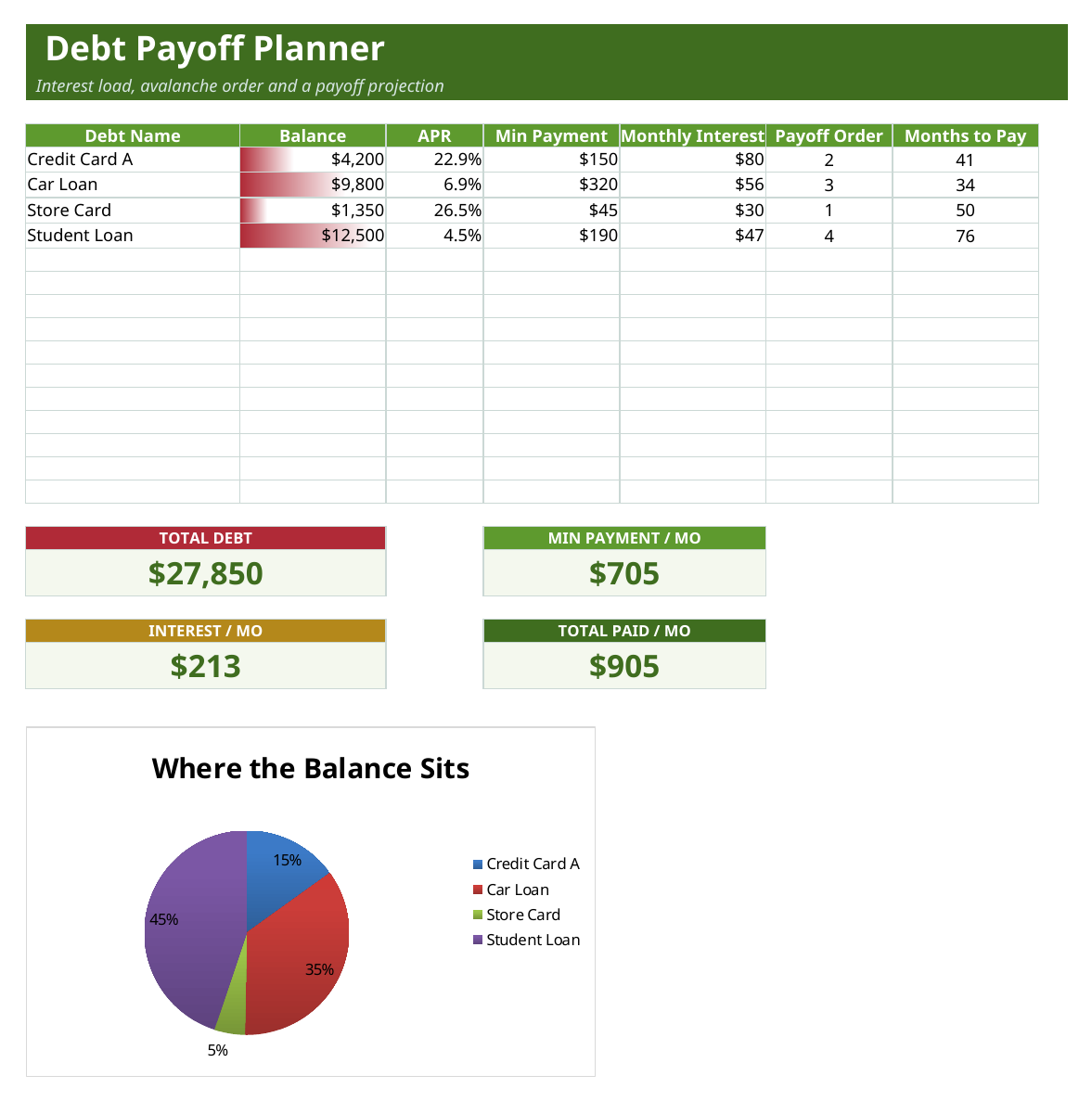
List each debt with balance, APR and minimum payment. The planner works out the monthly interest, the order to pay them off, and the months to clear each, with cards for total debt, minimum payments, monthly interest and total payment, plus a balance pie.
Payoff Projection
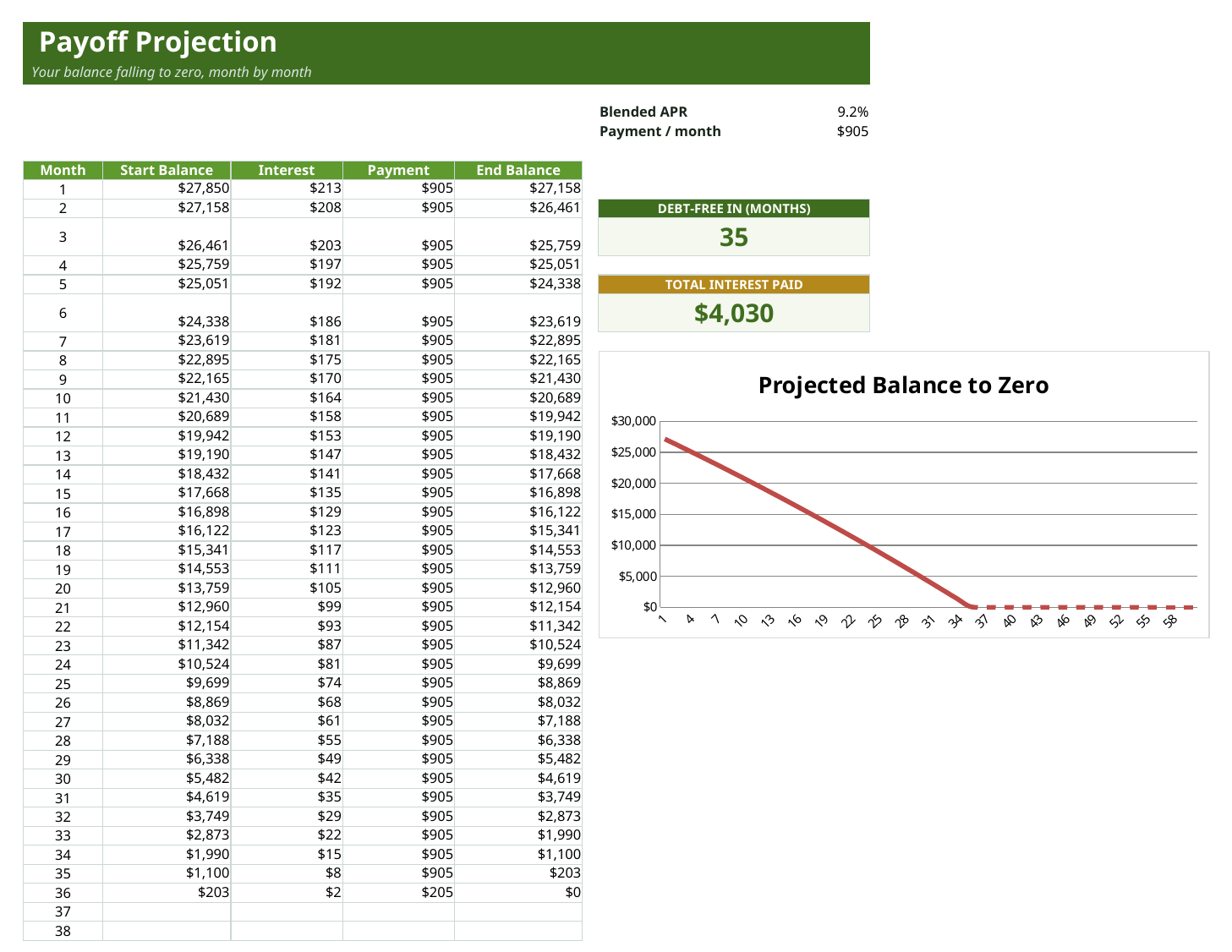
A month-by-month projection of your total balance falling to zero, with a payoff curve chart and headline cards for how many months to debt-free and the total interest you'll pay.
Who it's for
Anyone carrying more than one balance who wants a clear, motivating path out rather than a vague intention.
- People juggling several cards or loans who don't know which to hit first
- Anyone choosing between the snowball and avalanche methods
- Households that want a concrete debt-free date to aim at
In the box
What you get
- Balances + payment schedule
- Snowball vs avalanche comparison
- Debt-free countdown
- Progress + interest-saved charts
- Works in Google Sheets & Excel
Tips & good to know
Get the most out of it.
- Set your extra monthly payment on the Settings sheet, even a small amount visibly pulls the payoff date closer.
- Switch between Avalanche and Snowball in one dropdown and watch the payoff order and dates change, pick whichever keeps you motivated.
- Enter the real APR for each debt, it drives both the monthly interest and the payoff order.
- Watch the Payoff Projection curve, seeing the balance bend toward zero is what keeps the plan going.
Specs
The details.
- Sheets
- 4 tabs (Start Here, Settings, Debt Planner, Payoff Projection)
- Charts
- 2 native charts (balance pie, payoff projection line)
- Formulas
- 290+ live formulas (RANK, NPER, SUMPRODUCT payoff math)
- Works in
- Google Sheets, Microsoft Excel and Numbers (.xlsx)
- Sample data
- Example debts and rates, replace them with your own
- Delivery
- Instant, a private copy dropped into your Google Drive
- License
- Personal and business use, yours forever
Questions
Good to know before you buy.
Does it work in Excel and Google Sheets?
Yes. It's an .xlsx for Excel and Numbers, and opens in Google Sheets via File then Make a copy.
What's the difference between snowball and avalanche?
Avalanche pays the highest-interest debt first to save the most money, snowball pays the smallest balance first for quick wins. Switch between them in a dropdown and compare the results.
Does it show me when I'll be debt-free?
Yes. Based on your balances, rates and extra payment, it projects the months to debt-free and shows the balance falling to zero on a chart.
How many debts can I plan?
It's built for a typical mix of cards and loans out of the box, add your balances and the order and projection update automatically.
Is this a one-time purchase?
Yes, buy it once and the copy is yours to keep and re-run whenever your balances change.
Start to finish in a minute
How it works
1
Buy it
Check out securely through Paddle — cards, taxes, and receipts handled.
2
Copy to your Drive
One click drops your own private copy of “Debt Payoff Planner” into Google Sheets.
3
Make it yours
Wipe the sample data, add your own, and you're off. It never expires.