Spreadsheets · Freelancers
Freelance Invoice Kit
Look established from invoice number one. Fill in your details once and every invoice carries your name, numbering and tax automatically. Then a built-in log tracks what's paid, what's due and who's overdue, so chasing money stops being guesswork.
$14one-time · yours forever
Instant delivery
Google Sheets & Excel
Yours to keep & edit
What's inside
Built to do the work for you.
Auto-numbering
Sequential invoice numbers so nothing gets duplicated or missed.
Tax & discounts
Line-item tax, discounts, and totals calculated for you.
Aging tracker
Paid / due / overdue at a glance, with days-outstanding per client.
Branded template
Drop in your name and details once; every invoice matches.
A closer look
See it before you buy.
What's inside, tab by tab
5 tabs, each doing one job well.
Start Here
A one-page guide: fill your business details once, then reuse the invoice for every client.
Settings
Enter your business name, address, email and tax rate a single time, they flow onto every invoice automatically.
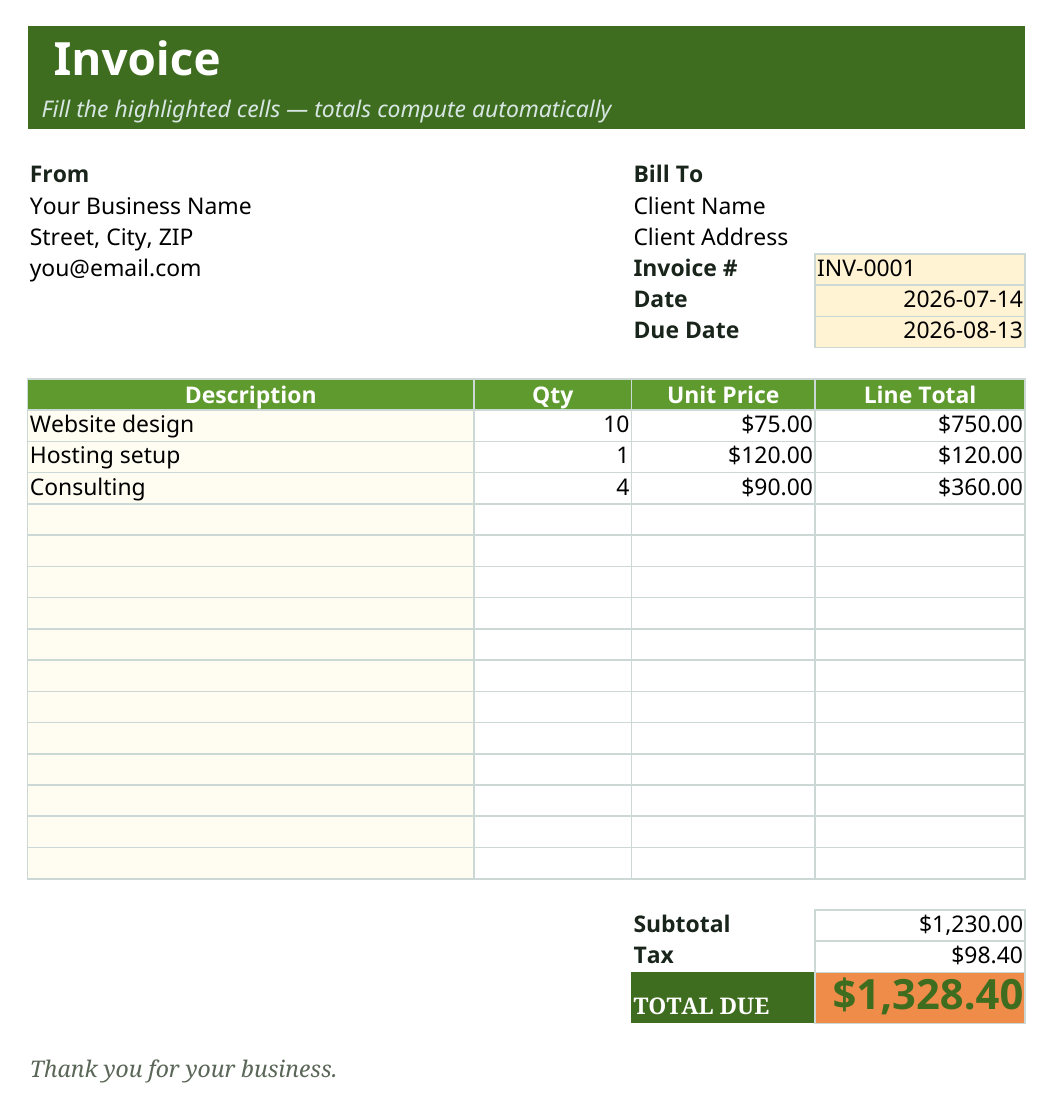
Invoice
The invoice itself: from and bill-to, an auto invoice number, a due date that sets itself 30 days out, line items, and subtotal, tax and total that calculate as you type. Just fill the highlighted cells.
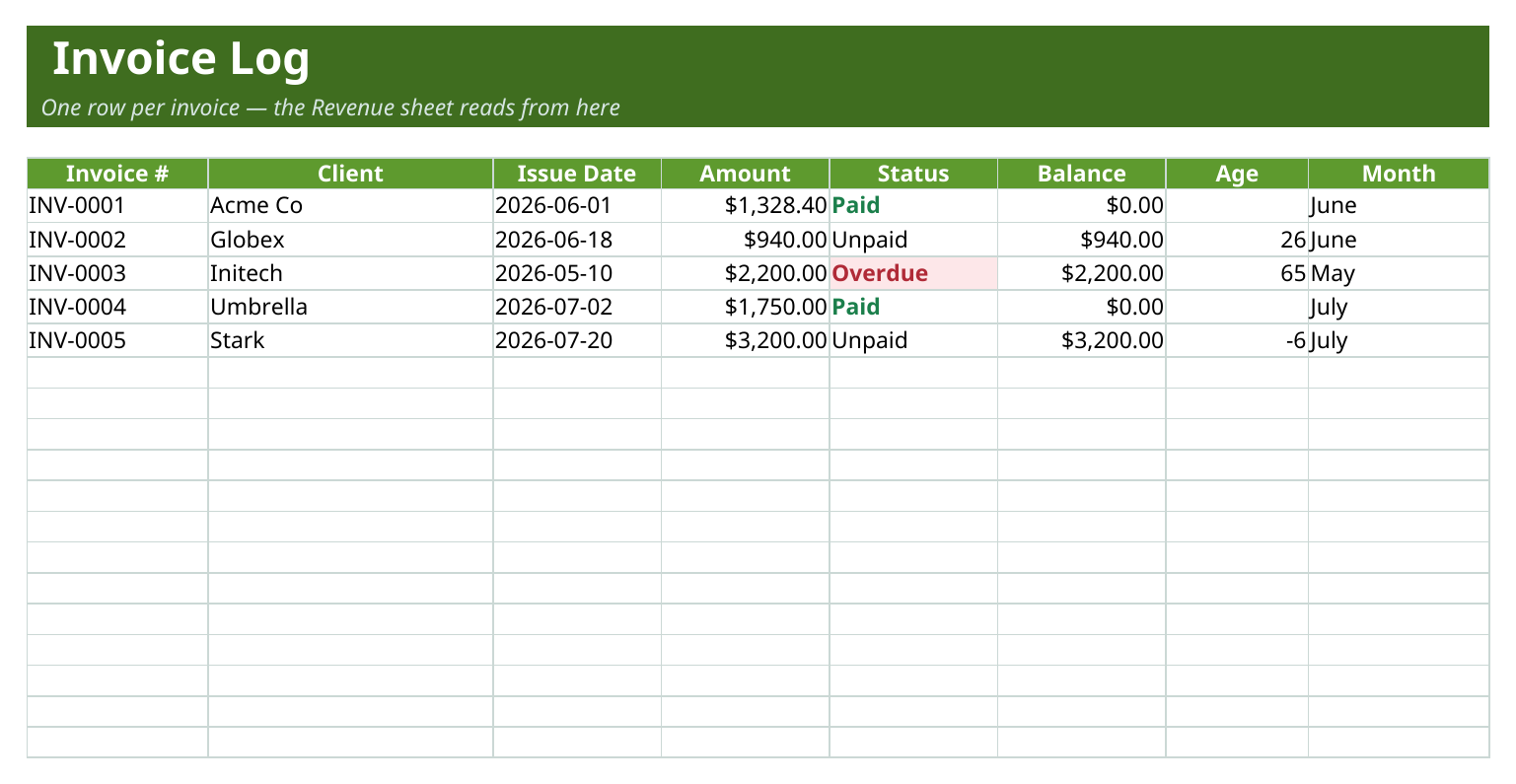
Invoice Log
A running tracker of every invoice with client, amount and a Paid / Unpaid / Overdue status, plus balance owed and days outstanding at a glance.
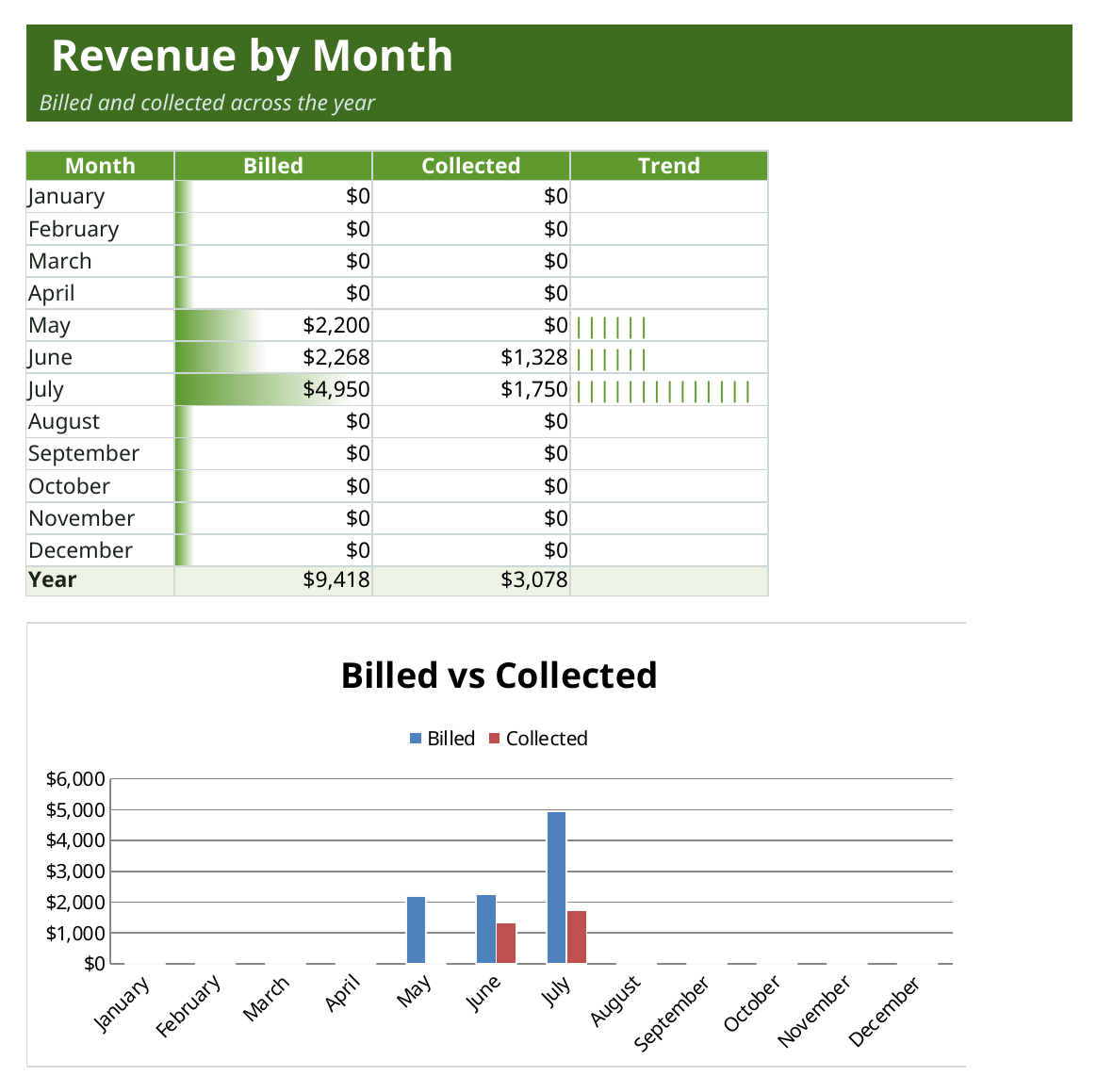
Revenue
A 12-month roll-up of billed versus collected with a bar chart, so you can see your income building across the year.
Who it's for
Freelancers and small operators who bill clients directly and want to look professional without buying invoicing software.
- Freelancers sending their first handful of invoices
- Consultants and contractors who bill several clients a month
- Small studios that want a paid/overdue view without a subscription tool
In the box
What you get
- Invoice template + client register
- Payments & aging tracker
- Tax and discount math built in
- Sample invoice to learn from
- Works in Google Sheets & Excel
Tips & good to know
Get the most out of it.
- Fill in the Settings sheet first, your name, contact details and tax rate flow onto every invoice automatically.
- The due date sets itself 30 days after the invoice date, change it in one cell if your terms are different.
- Only the highlighted cells are meant for typing, the totals and tax are formulas and update themselves.
- Log each invoice on the Invoice Log sheet as you send it so the paid/overdue view and revenue chart stay accurate.
Specs
The details.
- Sheets
- 5 tabs (Start Here, Settings, Invoice, Invoice Log, Revenue)
- Charts
- 1 native chart (billed vs collected by month)
- Formulas
- 300+ live formulas (SUMIFS, MATCH, auto-tax and totals)
- Works in
- Google Sheets, Microsoft Excel and Numbers (.xlsx)
- Sample data
- Example invoices and clients, clear them and add your own
- Delivery
- Instant, a private copy dropped into your Google Drive
- License
- Personal and business use, yours forever
Questions
Good to know before you buy.
Does this work in Excel as well as Google Sheets?
Yes. It's an .xlsx that works in Excel and Numbers, and opens in Google Sheets via File then Make a copy.
Are the invoice numbers really automatic?
Yes, invoices carry a sequential number so nothing gets duplicated or skipped, and you can set the starting number to match your own sequence.
Can I set my own tax rate, or turn tax off?
Yes. Set your rate once on the Settings sheet and it applies to every invoice, set it to zero if you don't charge tax.
How do I know who still owes me?
The Invoice Log shows every invoice as Paid, Unpaid or Overdue with the balance and days outstanding, so a glance tells you who to chase.
Is this a one-time purchase?
Yes, buy it once and the copy is yours to keep, reuse and edit for as many clients and invoices as you like.
Start to finish in a minute
How it works
1
Buy it
Check out securely through Paddle — cards, taxes, and receipts handled.
2
Copy to your Drive
One click drops your own private copy of “Freelance Invoice Kit” into Google Sheets.
3
Make it yours
Wipe the sample data, add your own, and you're off. It never expires.