Spreadsheets · Small biz
Inventory Tracker
Stop counting stock in your head. Log each item once and the sheet keeps a running tally of quantity and value, flags anything below its reorder point, and builds the reorder list for you, so you restock before you run out, not after.
$12one-time · yours forever
Instant delivery
Google Sheets & Excel
Yours to keep & edit
What's inside
Built to do the work for you.
Low-stock alerts
Rows turn red when a count drops below your reorder point.
Stock value
Quantity × cost totalled per item and across the whole inventory.
Reorder list
An auto-filtered view of exactly what needs restocking.
Movement log
Record what comes in and goes out so counts stay honest.
A closer look
See it before you buy.
What's inside, tab by tab
5 tabs, each doing one job well.
Start Here
A one-page guide: set your categories, log your items, and let the reorder flags do the watching.
Dashboard
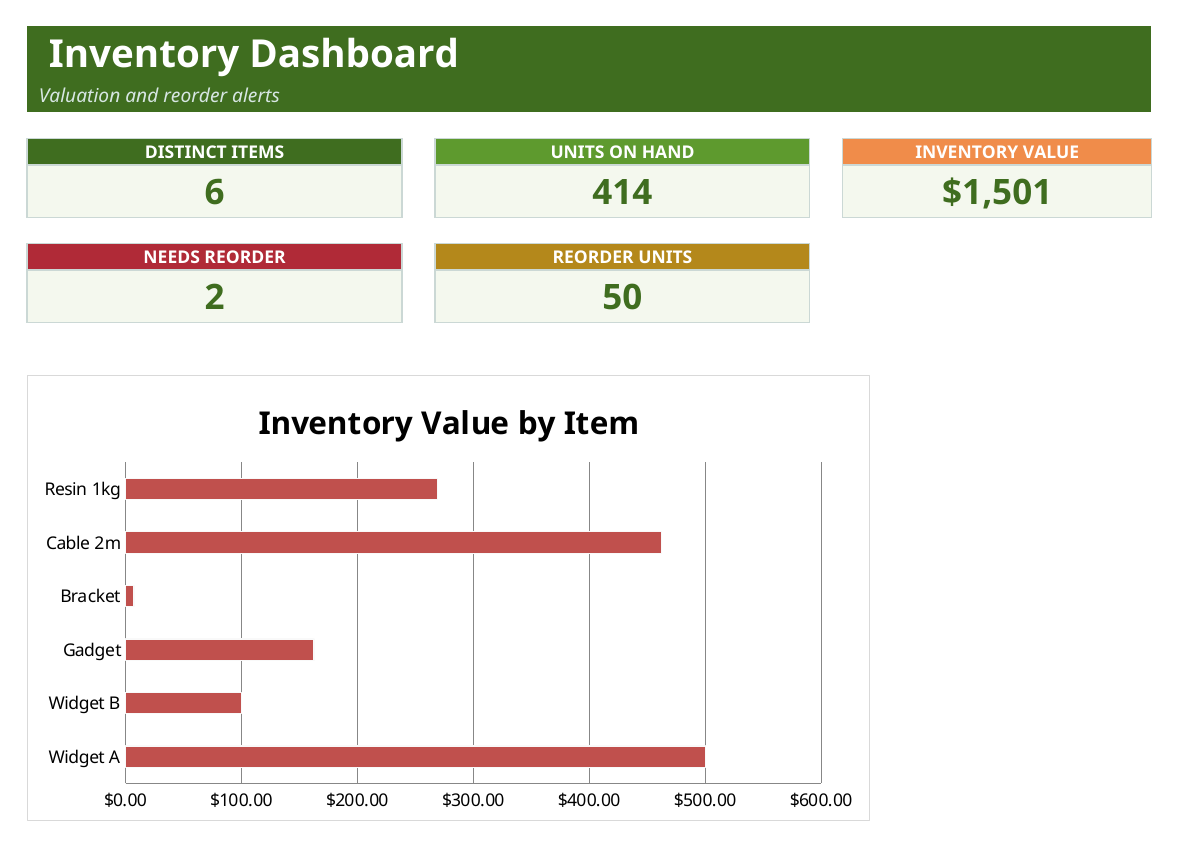
The big picture in five cards, distinct items, units on hand, total inventory value, how many items need reordering and the units to buy, plus a value-by-item bar chart.
Inventory
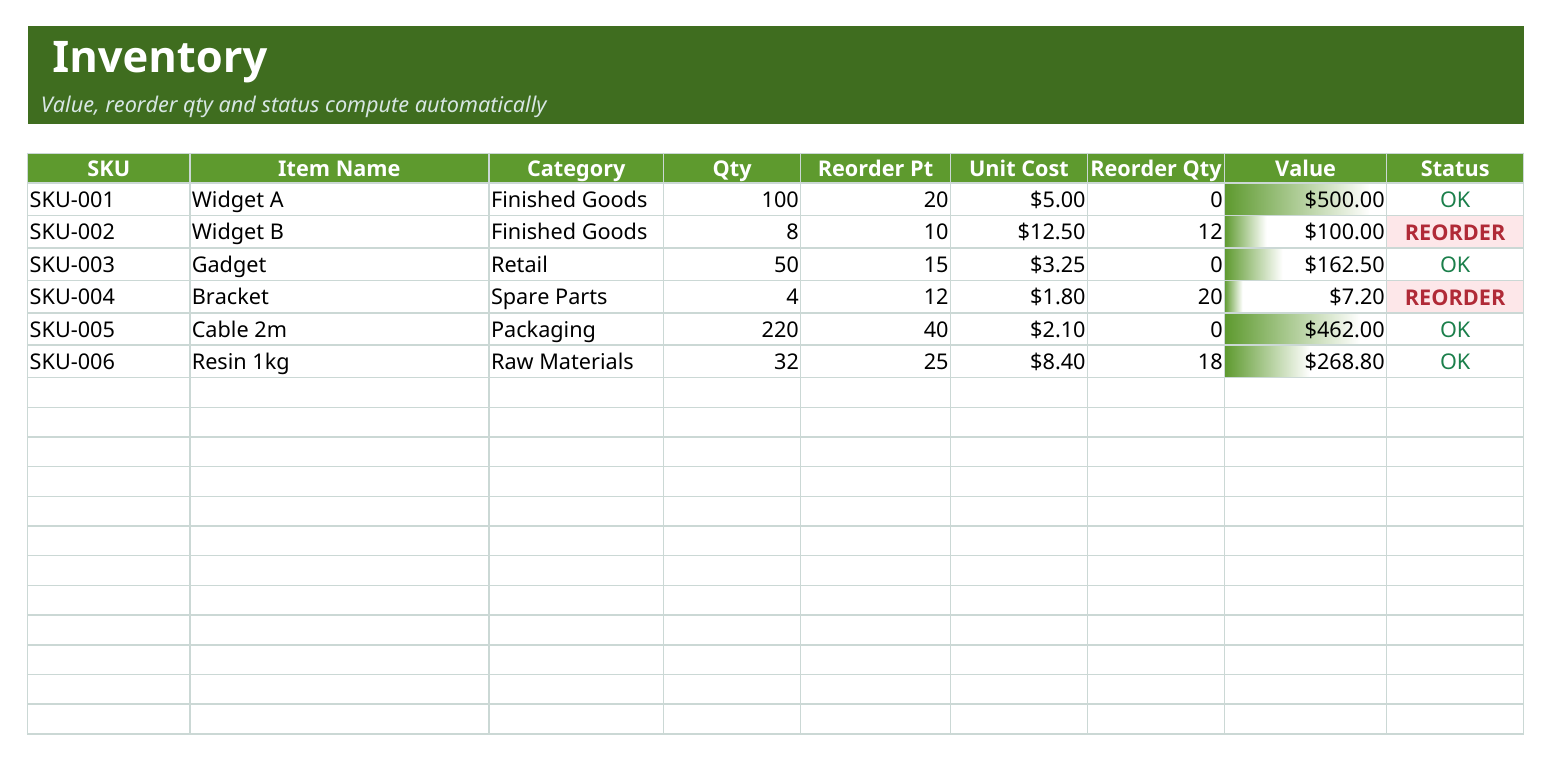
Your item list: SKU, name, category, quantity, reorder point and unit cost. Reorder quantity, stock value and an OK / REORDER status all calculate themselves, and low rows highlight automatically.
Value Trend
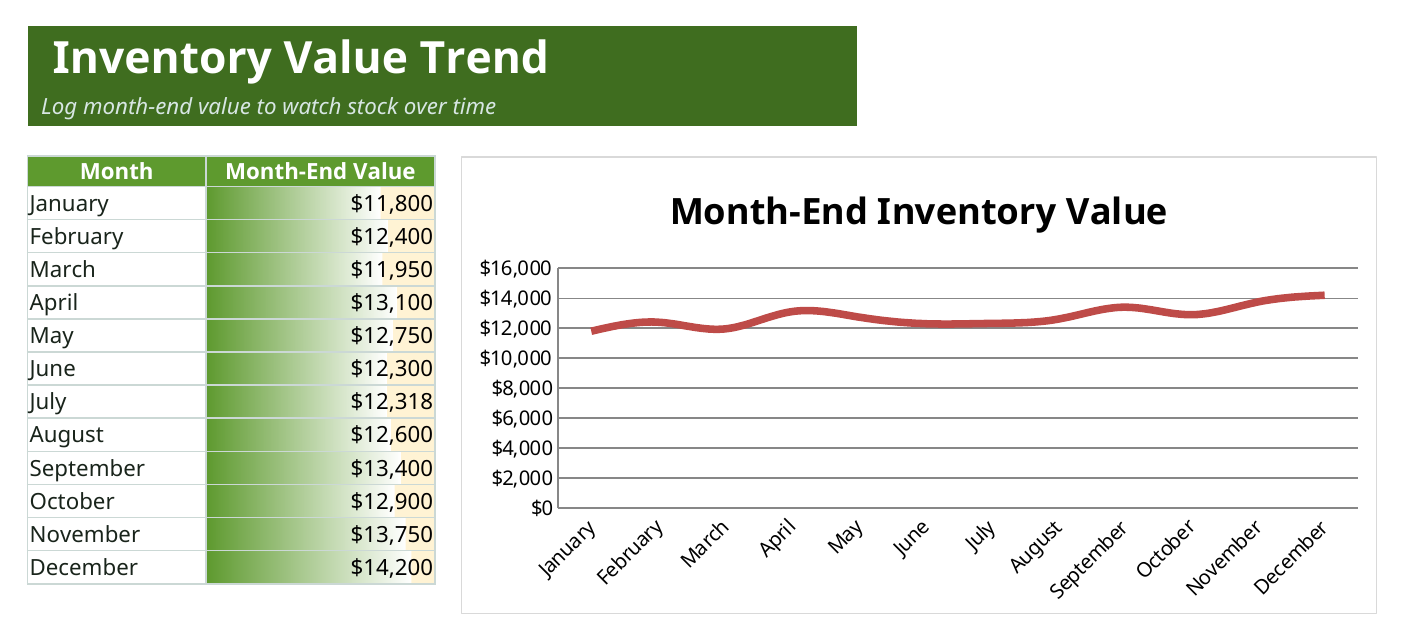
Record your month-end stock value and watch the trend on a line chart, so you can see inventory creeping up or drawing down over the year.
Settings
Set your product categories and the reorder multiplier once, everything else follows.
Who it's for
Small businesses and makers who hold physical stock and want to stay ahead of reorders without warehouse software.
- Shops and market sellers tracking products and supplies
- Makers and crafters managing materials and finished goods
- Small teams that want a live stock value without a paid inventory system
In the box
What you get
- Item list with live value totals
- Reorder-point highlighting
- Auto-filtered reorder view
- In/out movement log
- Works in Google Sheets & Excel
Tips & good to know
Get the most out of it.
- Set your categories on the Settings sheet before you add items, the dropdowns on the Inventory sheet use them.
- Give every item a reorder point, that single number is what turns the row red and drives the reorder list.
- Read the Dashboard cards for the money view, total value and reorder units tell you what to buy and what it will cost.
- Log your month-end value on the Value Trend sheet each month so the trend line actually means something.
Specs
The details.
- Sheets
- 5 tabs (Start Here, Dashboard, Inventory, Value Trend, Settings)
- Charts
- 2 native charts (inventory value by item, value trend line)
- Formulas
- 600+ live formulas (value, reorder logic, roll-ups)
- Works in
- Google Sheets, Microsoft Excel and Numbers (.xlsx)
- Sample data
- Example SKUs and counts, clear them and add your own
- Delivery
- Instant, a private copy dropped into your Google Drive
- License
- Personal and business use, yours forever
Questions
Good to know before you buy.
Does it work in Excel and Google Sheets?
Yes. It's an .xlsx for Excel and Numbers, and opens in Google Sheets via File then Make a copy.
How do the low-stock alerts work?
Give each item a reorder point. When the quantity drops to or below it, the row flips to REORDER and highlights, and it's added to the reorder count and units on the Dashboard.
Does it total the value of my stock?
Yes, quantity times unit cost is totalled per item and across the whole inventory, and shown live on the Dashboard.
How many items can I track?
The item list is built for a couple of hundred rows out of the box, plenty for a small shop or maker, and you can extend it.
Is this a subscription?
No, it's a one-time purchase and your copy is yours to keep and edit forever.
Start to finish in a minute
How it works
1
Buy it
Check out securely through Paddle — cards, taxes, and receipts handled.
2
Copy to your Drive
One click drops your own private copy of “Inventory Tracker” into Google Sheets.
3
Make it yours
Wipe the sample data, add your own, and you're off. It never expires.